
Turn your LinkedIn profile into a polished resume
Upload the PDF that LinkedIn makes of your profile and we rebuild it as a clean, ATS- and AI-friendly resume in the design you choose. Your experience, education, certifications and skills are filled in for you. No sign-up, and free designs are available.
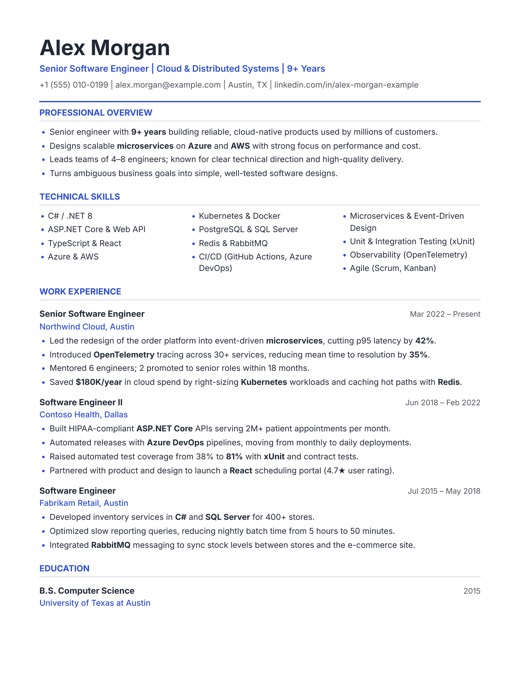
LinkedIn to resume in three steps
- 1
Save your profile as a PDF
On a computer, open your LinkedIn profile (Me → View profile). Click Resources below your headline (called More on some profiles), then Save to PDF.
- 2
Upload it here
Open the builder, choose From LinkedIn and select the downloaded Profile.pdf. Your resume is filled in within seconds.
- 3
Pick a design & download
Switch between 11 designs, polish any section with the live preview and download a real-text PDF.
What we import from your LinkedIn profile
| From LinkedIn | On your resume |
|---|---|
| Name & headline | Your name and a short professional title (the first part of your headline) |
| Contact | Email, phone, location and your LinkedIn URL as plain, searchable text |
| About / Summary | Professional summary, split into clear, readable points |
| Experience | Every role with title, company, city and dates in one consistent format (e.g. Aug 2023 – Present). Several roles at one company stay separate. |
| Education | Degree, institution and years |
| Certifications | Listed with your education |
| Top skills | Skills section, plus skills you mention in your headline, summary and job descriptions |
| Languages, honors & awards | Additional information section |
LinkedIn's PDF doesn't include your photo, recommendations or activity. You can add a photo in the editor for designs that use one.
How we beautify your LinkedIn PDF
LinkedIn's own PDF is a plain printout of your profile: a dark sidebar, long wrapped lines and durations like "(2 years 7 months)" after every date. Recruiters and applicant tracking systems prefer something cleaner. When you import, we:
- rejoin lines that LinkedIn wrapped, so each achievement becomes one clear bullet point
- write every date the same way and add the city to each employer
- gather your skills into a dedicated section that ATS keyword searches can find
- suggest soft skills for your field, which you can keep, edit or remove
- lay everything out in a professional design with standard headings and a real-text, tagged PDF
Start free. The Signature and Sidebar Pro designs are free to download. Premium designs with the highest ATS rating cost a small one-time fee.
Import from LinkedInTips for the best result
- Use a computer. LinkedIn's mobile app may not offer Save to PDF. On a phone, open LinkedIn in your browser and switch to the desktop site.
- Update LinkedIn first. Add short, results-focused descriptions to your recent roles; they become your resume bullet points.
- Tailor after importing. Your LinkedIn profile is written for everyone; edit the summary and skills to match the job you're applying for.
- Check each section. Profiles are filled in very differently, so review the result before you download.
Frequently asked questions
Can I just paste my LinkedIn profile URL?
No. LinkedIn doesn't allow other websites to read profiles from a URL, so we use the PDF that LinkedIn itself creates for you. It contains the same details and takes a few seconds to download: Resources (or More) → Save to PDF on your profile.
I can't find the Save to PDF option. What should I do?
Open your own profile on a computer and look for the Resources button below your headline; on some profiles it's called More. The option isn't available in every language or in LinkedIn's mobile app. If you can't find it, upload your existing resume instead.
Is importing from LinkedIn free?
Yes. Importing and editing are free, and our free designs can be downloaded as a PDF at no cost. Premium designs cost a small one-time fee per download.
Is a LinkedIn PDF good enough to send as a resume?
Not really. It's a printout of your profile rather than a resume: its sidebar layout, wrapped lines and durations after every date make it harder for recruiters and applicant tracking systems to scan. Importing it here gives you the same content in a clean, ATS-friendly resume.
Do you log in to my LinkedIn account?
No. We never ask for your LinkedIn password or connect to your account. You download the PDF yourself and choose to upload it.
What happens to the PDF I upload?
Its text is read in your browser and on our server to fill in the editor. As with every upload, we ask for your agreement first, and a copy with the name, email and phone in it is shared with the site owner. Details are in our Privacy Policy.
Ready to turn your LinkedIn profile into a resume?
It takes about a minute. Your draft is saved in your browser as you edit.
Import my LinkedIn profile